For Mac and Windows · Runs offline · Pay once

Build it once.
Present it every time.
Keep the story.

The presentation tool for the project you present more than once: the design review, the stakeholder update, the pitch that comes back every Thursday. One deck that grows with the project, and a written record of every meeting, made on your own machine.

Free for five full sessions. No account, no card. Windows is coming.

  1. BuildPick a starter deck and write straight on the slide.
  2. PresentOpen any slide or file the moment the room asks.
  3. SummarizeFeedback, decisions and next steps, written before you leave.
  4. The ArcNext time starts from last time. The story is kept.

The problem

The deck was never the problem. The forgetting is.

Version 14 of the same deck

One project, a folder of copies, and nobody sure which one the CEO saw.

The write-up that never happens

Six things in your head, one on a sticky note, and a room that remembers a different decision.

“Who decided that, and when?”

Three reviews in, nobody can point at the moment the scope changed.

Arclio keeps one deck per project and writes down what happened every time you present it.

Build

Spend the time on what you’ll say, not on the slides

Pick a layout, click, type. The layout keeps everything aligned, so a deck is ready in an afternoon and still looks designed.

  • Six decks to start from, or describe yoursSeventeen layouts, each with a prompt that says what it’s for. Paste a brief and the model drafts the deck; drop in a PowerPoint and it comes in laid out.
  • Keep the proof next to the claimFigma files, Loom recordings, live sites, PDFs and images, pinned to the slide they back up. Before and after is one frame with a divider.
  • Five themes, your colorsA typeface pair and an accent style each. A color, a picture or a video loop can sit behind a title.
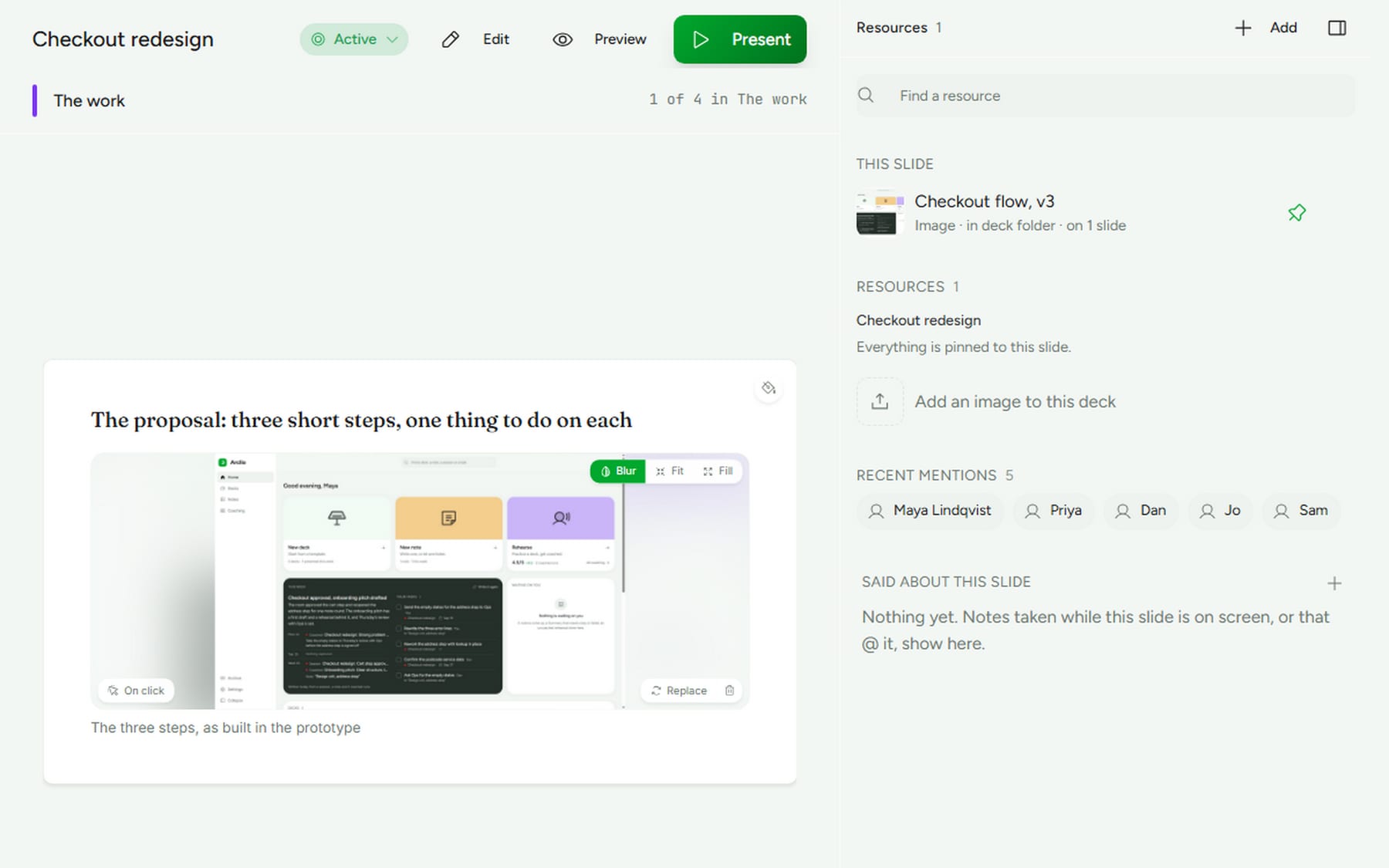
The Arclio builder: a slide with a pinned picture being edited, and the deck's resources and the people mentioned in the rail beside it
The builder: the slide, and the resources pinned to it in the rail
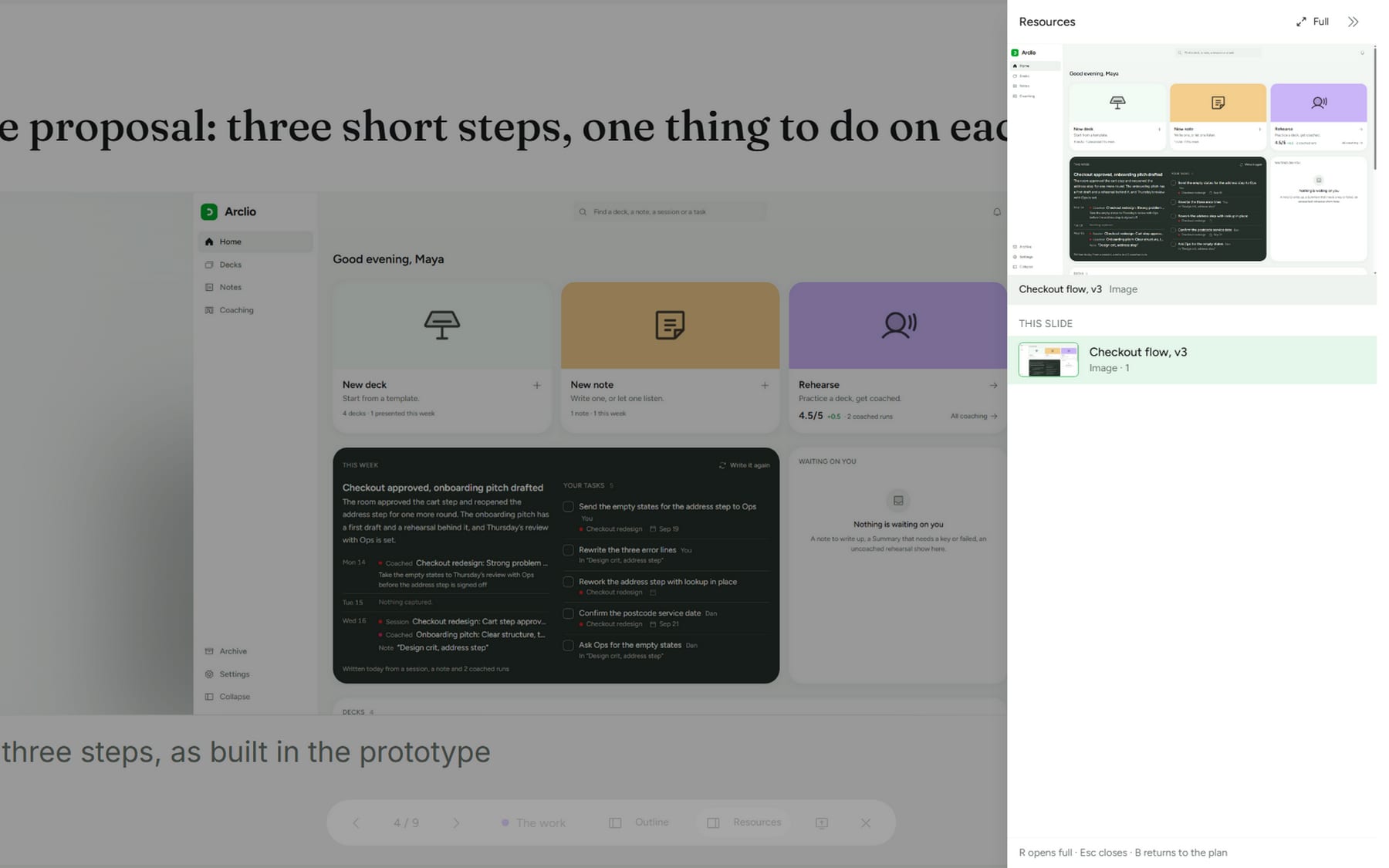
Present mode with the Panel peeked over the right edge of the slide: the pinned picture first, then the deck's resources, one click away
Present mode: the Panel peeks over the slide with everything you attached

Present

When the room changes direction, go with it

Someone wants the prototype. Someone else wants slide 12. Open it, talk it through, and step back into your plan with one key.

  • Everything you attached, one key awayThe files for this slide first. R peeks, again goes full, B returns to the plan. Paste a link to show a page that isn’t in the deck yet.
  • A second screen, or a window shared into the callYour notes, the next slide and the timer stay with you on Zoom, Meet or Teams.
  • Feedback as it happensOne line, Enter, done. Every line remembers the slide that was on screen.

Summarize

Leave the meeting with the write‑up already done

End the session and a local model writes the Summary in your language: what was said, what was decided, who owns what, and what to bring next time. About a minute and a half for an hour-long meeting.

  • Written for the people who weren’t thereA headline, feedback by theme, decisions, actions with owners and due dates, open questions.
  • It knows which slide was on screenAnd where the room pulled away from the plan, and for how long.
  • Names only when you typed themA thin recording gets an honest Summary. Edit any line, then export as Markdown or PDF.
EXAMPLE SUMMARY
Checkout redesign · Design review48 minOnlinePriya, Dan, Sam, Jo

Cart step approved; address step goes one more round

The room approved the three-step checkout and the new cart step as shown. The address step drew the most discussion and goes one more round so that address lookup lands with it rather than after it. Ops asked for the empty states before the final screens. Nobody argued for keeping the gift options on the payment step.

Feedback

  • Returning buyers should land on step two, with the saved address shown. One page or three steps · @Priya
  • The postcode lookup has to be there at beta or the address step will look unfinished. The address step, before and after

Decisions

  • Checkout ships as three short steps, not one page.
  • Gift options move to the receipt.

Actions

  • Send the empty states for the address step to Ops. Maya · due Sep 17
  • Confirm the postcode service date. Dan · due Sep 19

Where the room pulled away

The address step, before and after. Four minutes on whether address lookup is a beta blocker. Settled: it is.

Next session

Suggested goal: sign off the address step with lookup in place, and set the beta date. Carry forward: empty states, saved cards on the first step.

An example, written the way Arclio writes one. Every claim in a real Summary comes from the transcript or from what you typed.

The Arc

Every meeting adds to the story

Each session is kept with its Summary and the deck as it was that day. That is the Arc: the project’s memory, in order, in your own folder.

  • The next session starts from the lastThe goal and the open items are already filled in, the closing slide can be written from them, and the deck as it was that day is kept as a version you can go back to.
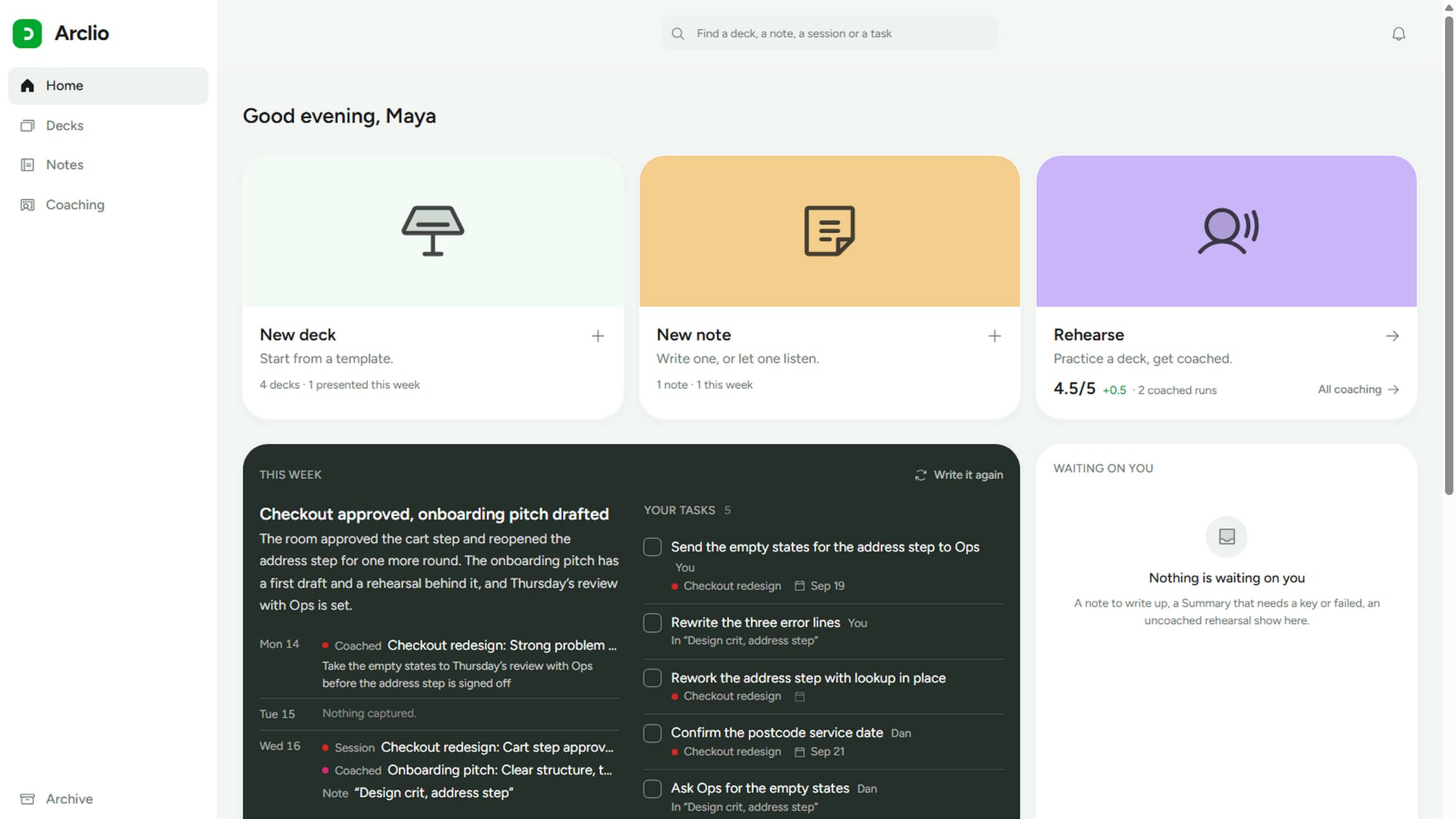
  • Your week, read for youThe home screen says what was captured each day, what is waiting on you, and every open action in one list.
  • The whole project as one documentStory so far reads like a case study. Good for a town hall, a hand-over or a portfolio.
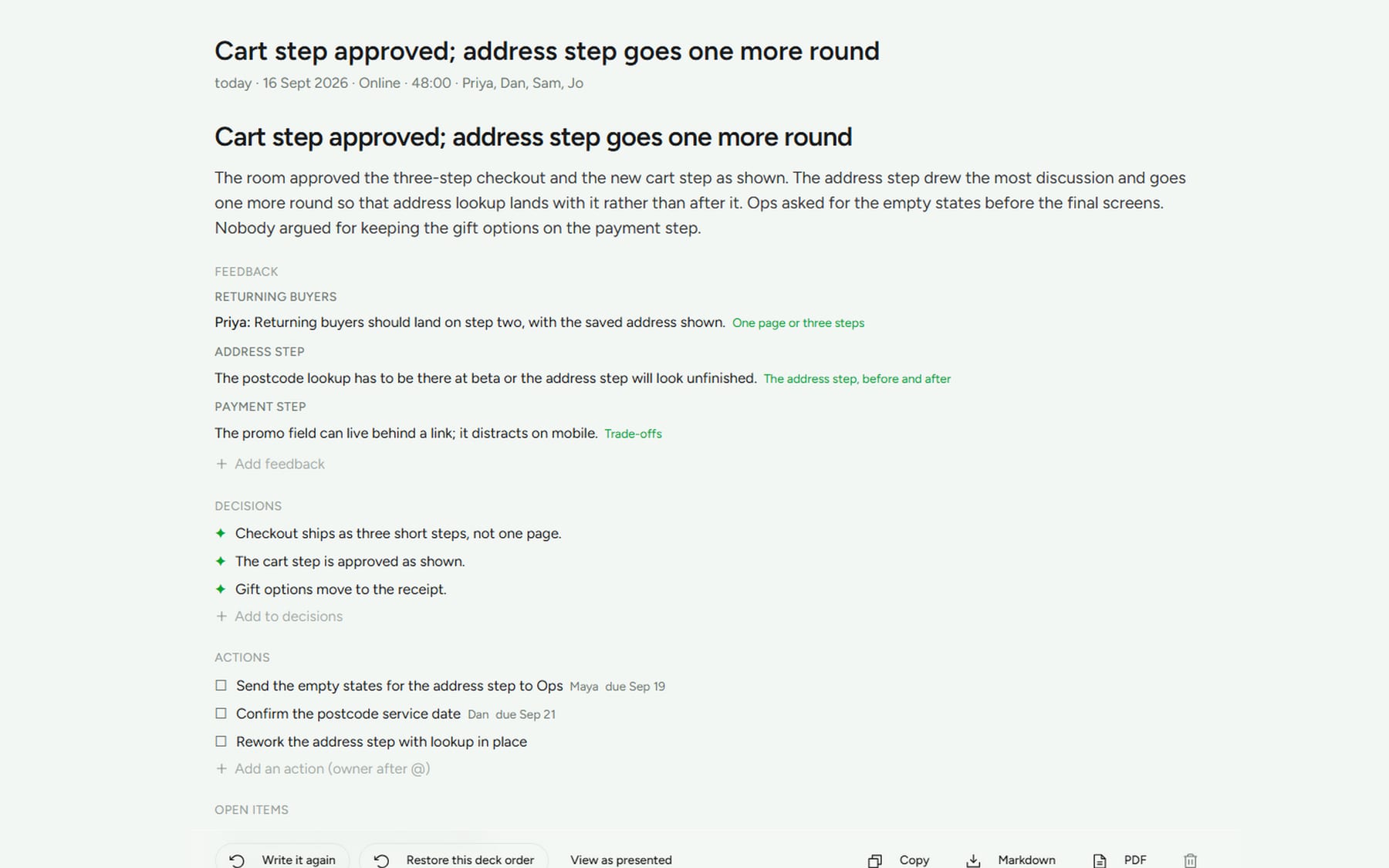
A session's Summary as a page: the headline, the paragraph for the people who were not there, and feedback by theme with the slide each line points at
A session in the Arc: the Summary, editable, with export to Markdown or PDF
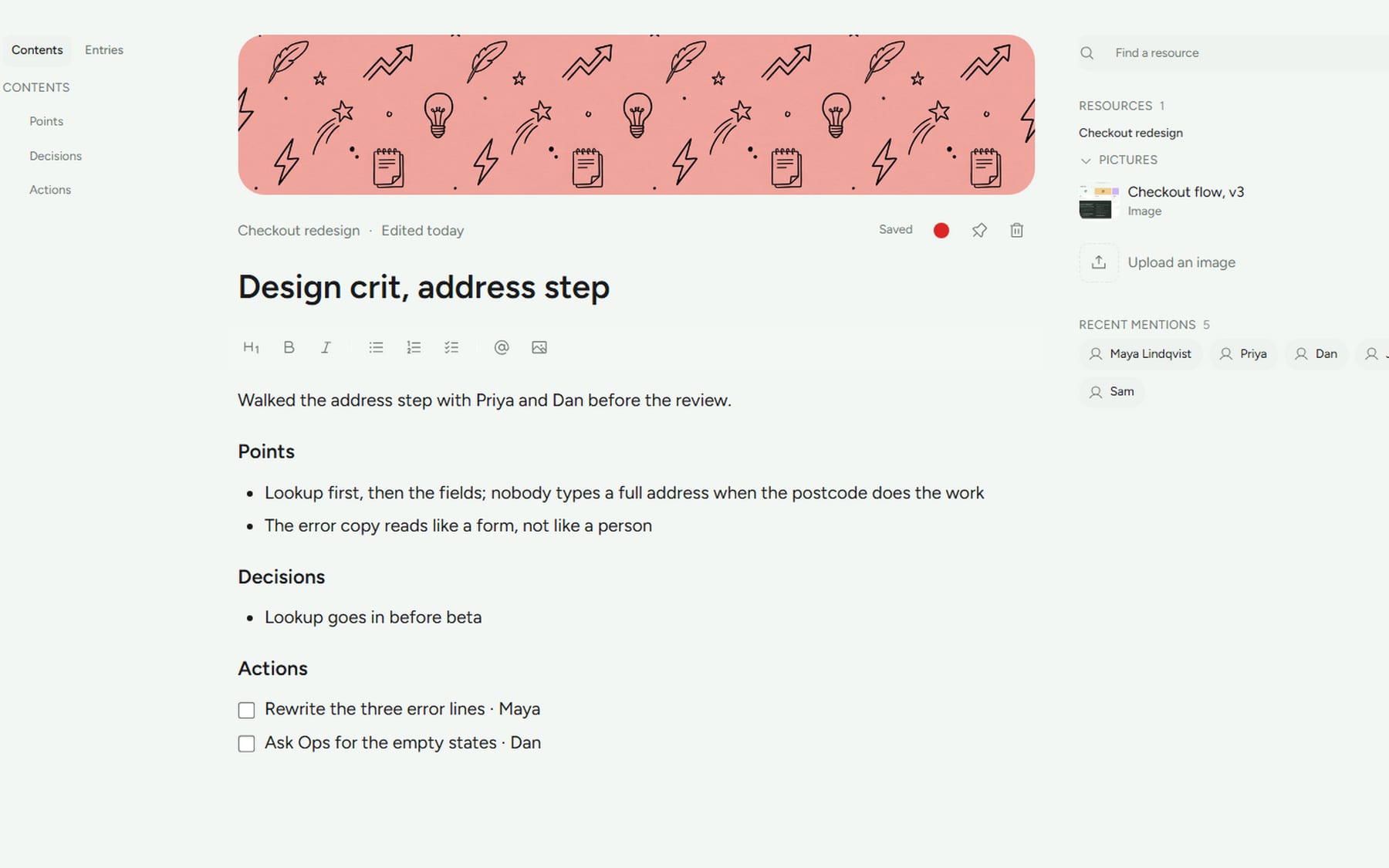
A doc's page: the write-up with its points, decisions and a checklist of actions, and the people mentioned beside it

Studio

Docs that know what they’re about

The crit in the corridor, the call that wasn’t a presentation. Write it, or let Arclio listen, point it at the slide, the file or the person with an @, and pin the pictures on a canvas beside it.

  • Let a doc listenPress Listen before a conversation. When you stop, the points, decisions, actions and people are written into it.
  • A doc grows with its subjectListen again next week and the new entry is dated under the last one, saying what changed.
  • People are remembered, not managedAnyone named as an attendee or a speaker is offered on @ everywhere you type.
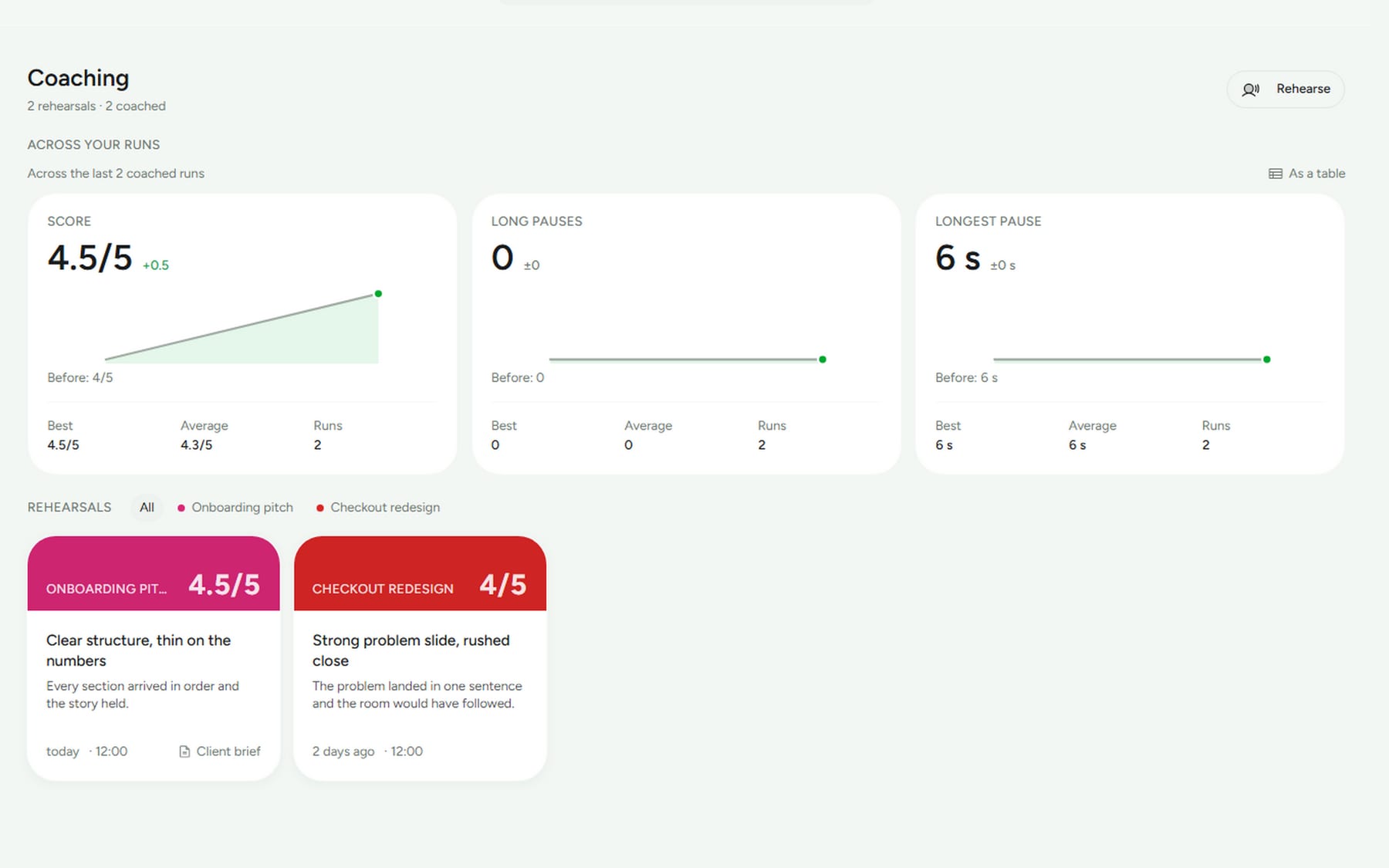
The Coaching page: the score, long pauses and longest pause across runs as tiles with a trend line, and each coached rehearsal as a card with its headline and verdict

Rehearse

Practice with a coach that only tells you the truth

Run through the deck on your own and get a report on your timing, your pace and what you skipped, with your own words quoted back to you. Paste the brief and the coach checks you covered it; the report lands as a doc on the deck.

  • Every number is measuredTime per slide, words a minute, fillers and the longest pause, from the recording, never estimated.
  • Every quote is checkedAgainst what you actually said. If the coach can’t prove a point, it doesn’t make it.
  • See the trend across runsScore, pace and coverage from one rehearsal to the next, so the third run is better for a reason you can name.
0:48longest stop on one slide
130words a minute, in the band
4 of 5points of the brief covered

Why Arclio

A slide tool forgets the meeting. A note-taker forgets the deck.

Arclio is the two together, for the project that comes back.

What you needSlide toolsAI note-takersArclio
One deck that grows with the projectA file per versionNo deckOne deck, every session kept
What was said, decided and owedNot their jobA transcript and a recapA Summary that knows the slide
The next meeting starts from the lastIf you rememberSearch the transcriptsGoal and open items filled in
Where the recording goesNo recordingTheir serversNowhere. Transcribed here, then deleted
A coach for the run beforeA timerNot their jobMeasured, quoted, checked
What it costsPart of a suiteA subscription per seat£29.99, once

Keynote, PowerPoint and Google Slides are still where you make a keynote. Arclio is for the project you present to the same people until it ships.

Privacy

“Arclio runs entirely on this computer. Recordings, transcripts and summaries never leave it.”
No account, no cloudNothing you record or write is uploaded. The models download once, then it works offline.
Audio isn’t keptRecordings are transcribed and deleted, unless you choose to keep them.
It never guessesNo name unless you typed it. No quote the coach can’t prove.
Your folder, your filesPlain files, where you say. Point it at iCloud Drive or Dropbox to take it between machines.

Made by Camwei Limited, an independent studio. Every release ships with a changelog that says what changed and what was checked.

Price

Pay once. Use it for every project after.

No subscription, no per-use fees. The models run on your machine, so there is nothing to count. Updates are included.

Mac
  • macOS 14 or later
  • Apple silicon, M1 or later
  • 16 GB recommended

Intel Macs aren’t supported.

Windows
  • Windows 11
  • No graphics card needed
  • 16 GB recommended

One purchase covers both.

Arclio for Mac and Windows

£29.99 one-time · VAT included where it applies

The key arrives by email a few minutes after checkout and unlocks the Summary after your fifth session. Nothing you made is ever lost. Use it on up to three computers.

  • Every feature, every update, no tiers
  • Free for five full sessions before you decide
  • Your work stays yours if you never buy

Checkout is by Stripe. Camwei never sees your card, and Arclio never goes online to check your key.

Questions

Good to know

Does it work offline?

Yes. After the models download once, you don’t need a connection. Presenting, listening, the Summary and the coach all run on your machine.

Can it listen to a Zoom, Meet or Teams call?

Yes. An online session captures the call’s audio along with your microphone, after the system’s own permission prompt. In a room it uses the microphone. A recording indicator stays on screen for as long as it records, and you’re asked to tell the room. A ten-second listening test on the start sheet shows you it’s working before the meeting does.

Does it know who said what?

Only when you tell it. A wrong name in a Summary is worse than no name, so Arclio never guesses. Type @Priya in front of a line during the meeting and it stays attached. On a call it does tell you and the room apart.

How long does the Summary take, and how good is it?

About a minute and a half for an hour on an M1 with 16 GB. It’s written from the transcript and from what you typed, checked against the deck, and it says plainly when the recording was too thin to say more. Everything is editable.

Where is my data?

In a folder you choose on first launch, as plain files: one folder per deck with its sessions, transcripts and Summaries, and a folder for notes. Point it at iCloud Drive or Dropbox to take it between machines. Model files live with the app, not in your folder.

Does it slow my computer down during a meeting?

Listening is light. The writing happens when you end the session, and it runs in the background, so you can close the sheet and move on.

Can I bring in my Keynote or PowerPoint deck?

Yes. Drop in a PowerPoint and it comes in laid out in Arclio’s layouts; Keynote and Google Slides get there through their PowerPoint export. Or paste a brief, or a document, and the model drafts the deck for you to review. Going the other way, a deck exports as a PDF, a slide a page, and as a PowerPoint with every slide as a picture and your notes as speaker notes; every Summary and doc exports as Markdown or PDF.

What happens when the trial ends?

The trial is the full app for five sessions. After that, presenting and saving keep working; only the written Summary waits for a key. You never lose a deck, a session or a note. Rehearsals never count toward the trial.

Which computers does it run on?

Mac: macOS 14 or later on Apple silicon, M1 or later. Intel Macs aren’t supported. Windows: Windows 11, no graphics card needed. 16 GB recommended on both. One purchase covers both.

What does it need on disk and in memory?

About 6 GB of disk for the app and both models, downloaded once at first launch. Gemma 4 writes and Whisper listens, both open weights, both on your machine. 16 GB of memory is recommended; 8 GB works with the smaller transcription model. Turn on vision in Settings and Gemma can see the pictures on your slides, an extra download. If you already run models with Ollama or LM Studio, Arclio can use one of those instead of downloading its own.

Does it work in my language?

Arclio reads in English, Dutch, Spanish, Italian and French, chosen at first launch or in Settings. Whisper listens in that language, and the Summary, the coach and the docs are written in it. Words like Deck, Summary and the Arc stay as they are.

How do I capture something quickly?

Press ⌘⇧N anywhere on your Mac while Arclio runs and a small field opens over whatever you’re looking at; ⌘↵ saves it as a doc on the deck you worked on last. A #tag in any doc becomes a filter in the Studio, and @Name attaches a person.

Lost your key?

Enter the email you bought with on the resend page and it’s sent again.

Next Thursday

Present the deck you already have. Leave with the write-up.

Download Arclio, open your next review in it, and end the session. The Summary is the first thing you’ll want to send.